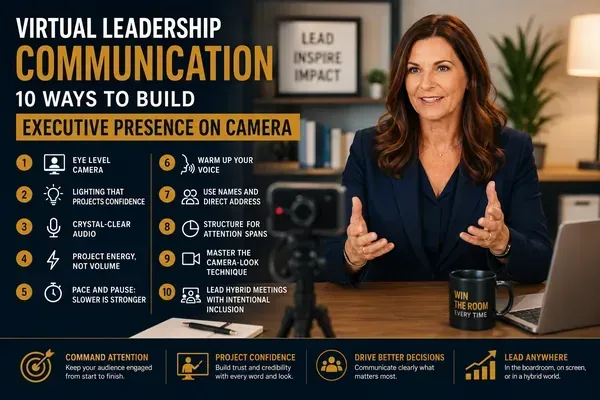
Virtual Leadership Communication: What are 10 Ways to Build Executive Presence on Camera?
Quick Answer: Virtual executive presence requires intentional adjustments to your physical setup, vocal delivery, and engagement approach. Leaders who project authority on camera master three things: technical environment control, vocal energy calibration, and proactive audience engagement. These 10 techniques will help you lead as effectively on screen as you do in person.
Introduction
The shift to virtual and hybrid communication is permanent. For senior leaders, this is not a temporary adjustment. It is a fundamental change in how executive presence is perceived and projected.
The challenge is real. Presence that works in a physical room does not automatically translate to a screen. Subtle cues like posture, spatial awareness, and room energy disappear. What remains is a rectangle on a screen competing with email notifications, open browser tabs, and a dozen other rectangles.
Yet some leaders command attention on camera as effectively as they do in person. They are not doing anything magical. They are applying specific, learnable techniques that translate presence into a virtual format.
These 10 strategies cover every dimension of virtual leadership communication: the technical foundation, the vocal adjustments, the engagement tactics, and the hybrid meeting dynamics that define modern executive communication.
Technical Foundation: Your Setup Is Your Stage
1. Camera Positioning: Eye Level Is Authority Level
Your camera angle communicates power dynamics before you say a word. A camera looking up at you makes you appear dominant and disconnected. A camera looking down creates the impression of submission or disengagement.
The standard:
Position your camera at eye level, directly in front of you
Your eyes should be in the upper third of the frame
Maintain roughly 18 to 24 inches from the camera
Your frame should show from mid-chest to just above your head
Key Insight: When your camera is at eye level and you look directly into the lens during key moments, you create the perception of direct eye contact with every participant. This is the virtual equivalent of commanding the room.
2. Lighting That Projects Confidence
Poor lighting makes you look tired, unprofessional, or disengaged, regardless of what you are saying.
Lighting setup:
Place your primary light source directly in front of you, behind your monitor
Avoid overhead lighting that creates harsh shadows under your eyes
Eliminate backlighting from windows behind you
Use a ring light or desk lamp with warm white light for consistent results
3. Audio Quality: Your Voice Is Your Primary Tool
In virtual communication, your voice carries an even greater share of your presence. Poor audio quality, echo, or background noise immediately undermines authority.
Audio essentials:
Use a dedicated external microphone or high-quality headset
Test your audio in the actual room where you will present, not just at setup
Close windows and eliminate ambient noise sources
If using a conference room, test speaker placement and echo before the session
Vocal Adjustments for Camera
4. Project Energy, Not Volume
Virtual communication creates an energy gap. What feels natural in person often reads as flat on screen. You need to project 20 to 30 percent more energy on camera to achieve the same impact.
How to calibrate:
Speak with slightly more emphasis and articulation than you would in person
Smile deliberately when appropriate. Your facial expression is amplified on screen
Use vocal variety more aggressively: contrast pace, pitch, and volume to sustain attention
Record yourself and compare your energy level to a presenter you admire on video
Key Insight: The camera flattens your energy. What feels slightly exaggerated to you will read as engaged and confident to your audience. If it feels normal to you on camera, you are probably reading as flat.
5. Pace and Pause: Slower Is Stronger
Network latency, audio compression, and the absence of physical presence cues all mean that your audience processes virtual speech differently.
Virtual pacing guidelines:
Slow your pace by approximately 10 to 15 percent compared to in-person delivery
Extend your pauses. A one-second pause in person needs to be two seconds on camera
Allow for a brief silence after asking questions to account for the virtual delay
Avoid filling silence with filler words. The pause is working for you
6. Vocal Warm-Up Before Every Virtual Session
Before any important virtual meeting, warm up your voice. Cold vocal delivery sounds stiff and lacks resonance.
Quick 3-minute warm-up:
Hum at a comfortable pitch for 30 seconds
Do lip trills (buzzing your lips) on an exhale for 30 seconds
Practice tongue twisters at moderate pace for one minute
Read a paragraph aloud at your target energy level for one minute
Engagement Techniques
7. Use Names and Direct Address
In virtual meetings, attention drifts quickly. Using participants' names is the most effective way to maintain engagement and signal that you are leading an interactive conversation, not delivering a monologue.
How to implement:
Address participants by name when asking questions: "Sarah, what is your team seeing on the ground?"
Reference previous contributions: "Building on what James mentioned earlier..."
Use names when transitioning between topics: "Michael, I want to bring you in on this next point"
In larger meetings, keep a participant list visible and reference it deliberately
8. Structure for Attention Spans
Virtual attention spans are shorter than in-person. Research consistently shows that virtual audiences begin to disengage after 8 to 10 minutes of uninterrupted content.
Structural techniques:
Break your content into segments of no more than 8 minutes
Insert an engagement moment between each segment: a poll, a question, a reflection prompt
Use the chat function strategically to gather input and signal interactivity
Preview your structure at the start: "I have four points to cover. After each, I will pause for your input."
Key Insight: The leaders who are most effective on camera do not try to replicate in-person presentations. They redesign their communication for the medium. Shorter segments, more interaction, and frequent engagement check-ins are the formula.
For a complete framework on virtual communication mastery, see the Virtual Executive Communication Guide.
9. Master the Camera-Look Technique
Looking at the camera lens is the virtual equivalent of making eye contact. Most leaders look at the screen, which creates the impression that they are looking slightly away from the audience.
When to look at the camera:
During your opening and closing statements
When making your most important points
When directly addressing a specific participant
When answering questions
When to look at the screen:
When reading the room for reactions
When referencing shared content
When taking notes
The balance: Aim for 60 percent camera and 40 percent screen during key moments. During collaborative discussion, looking at the screen is natural and expected.
10. Lead Hybrid Meetings with Intentional Inclusion
Hybrid meetings, where some participants are in the room and others are remote, create a two-tier experience if not managed intentionally.
Hybrid leadership strategies:
Address remote participants first and frequently. They are the ones most likely to feel excluded
Use a dedicated facilitator for the in-room discussion so you can focus on managing the full group
Repeat in-room comments for remote participants: "For those joining virtually, David just raised a point about..."
Position the in-room camera so remote participants can see the full room, not just the presenter
End meetings by asking remote participants specifically if they have additional input
Key Takeaways
Camera at eye level, proper lighting, and quality audio form the non-negotiable technical foundation
Project 20 to 30 percent more energy on camera than you would in person to avoid reading as flat
Slow your pace and extend your pauses for virtual delivery. The medium requires it
Use participants' names frequently and structure content in segments of 8 minutes or less
Look at the camera lens during key moments to simulate direct eye contact
Warm up your voice before every important virtual session
In hybrid meetings, prioritize remote participants to prevent a two-tier experience
Ready to Master Virtual Executive Presence?
Virtual communication is now a permanent leadership skill, not a backup. Download the Virtual Executive Communication Guide for a complete system that covers technical setup, vocal techniques, audience engagement, and hybrid meeting strategies designed specifically for senior leaders.
About the Author: Lisa Hugo is a Dubai-based executive communication coach with over a decade of experience helping C-suite leaders, entrepreneurs, and senior executives command rooms, cameras, and conversations. She is the creator of the Win The Room program.