
Table of Contents
Executive Summary
Introduction: Mastering the New Medium of Leadership
Chapter 1: The Virtual Communication Landscape
Chapter 2: Technical Excellence
Chapter 3: Virtual Executive Presence
Chapter 4: Leading Virtual Meetings
Chapter 5: Virtual Presentations and Webinars
Chapter 6: One-on-One Virtual Communication
Chapter 7: Hybrid Meeting Mastery
Chapter 8: Virtual Communication Excellence Framework
Conclusion: Leading Without Limits
Key Takeaways
About the Author
Executive Summary
Virtual communication has become a permanent and essential component of executive leadership. Whether you are leading a multinational team across time zones, presenting to a board scattered across three continents, or coaching a direct report from your home office, your ability to communicate effectively through a screen directly impacts your influence, credibility, and career trajectory.
This comprehensive guide addresses every dimension of virtual executive communication, from the technical foundations that ensure you look and sound professional to the advanced interpersonal skills required to build trust, inspire teams, and drive decisions through digital channels. It is designed specifically for senior leaders who recognize that virtual communication demands a different set of skills than in-person interaction and who are committed to mastering this medium rather than merely tolerating it.
Drawing on more than 20 years of coaching executives through communication challenges, and extensive experience helping leaders adapt to the rapid shift toward virtual and hybrid work, Lisa Hugo provides proven strategies for projecting executive presence on camera, leading engaging virtual meetings, delivering compelling virtual presentations, and navigating the nuances of hybrid environments where some participants are in the room and others are on screens.
Each chapter includes practical advice, quick tips, and real-world insights that you can implement immediately. Whether you are a seasoned executive seeking to refine your virtual skills or a rising leader preparing for a future that is increasingly digital, this guide will transform how you communicate, connect, and lead through screens.
Introduction: Mastering the New Medium of Leadership
The way executives communicate has changed fundamentally. Video conferences, virtual town halls, digital presentations, and hybrid meetings are no longer temporary substitutes for in-person interaction. They are permanent fixtures of the executive communication landscape. The leaders who thrive in this environment are not those who tolerate virtual communication but those who master it.
The shift to virtual communication has exposed a significant skills gap. Many executives who are commanding and charismatic in person struggle to project the same presence, authority, and warmth through a screen. Their energy falls flat. Their body language disappears behind a desk. Their voice sounds thin through laptop speakers. And their ability to read the room, to sense engagement and adjust accordingly, is severely diminished when the "room" is a grid of thumbnail images.
This is not a minor inconvenience. It is a leadership liability. When your audience is disengaged, when your message does not land, when your presence fails to inspire confidence, the consequences are real: missed alignment, poor decisions, weakened relationships, and eroded credibility.
But here is the good news. Virtual communication is a skill, and like any skill, it can be learned, practiced, and mastered. In my work coaching executives across industries and regions, I have seen leaders transform from awkward, disengaged virtual communicators into compelling, connected digital presenters who project the same authority and warmth on screen that they do in person.
This guide provides the complete roadmap for that transformation. It covers the technical foundations, the presence techniques, the meeting leadership strategies, and the interpersonal skills you need to communicate at the highest level through any digital medium. The virtual world is your stage. Let us ensure you command it.
Chapter 1: The Virtual Communication Landscape
Virtual vs. In-Person Differences
Virtual communication differs from in-person communication in fundamental ways that most executives underestimate. In person, you communicate with your entire body, from your posture as you enter a room to how you shake hands, how you position yourself at a table, and how your energy fills the space. On screen, your communication is compressed into a small rectangle, and most of these physical cues disappear.
Research from Stanford University's Virtual Human Interaction Lab identifies several key differences. First, sustained mutual eye contact at close range, which happens naturally on video but rarely in person, creates cognitive fatigue. Second, the inability to use spatial cues, such as turning toward someone or leaning in, reduces your ability to signal attention and connection. Third, seeing your own face continuously during conversation creates self-evaluation anxiety that drains mental resources.
Key Insight: Virtual communication does not simply reduce in-person communication. It creates a fundamentally different communication environment with its own rules, challenges, and opportunities. Executives who try to replicate their in-person style without adaptation will consistently underperform.
Technology Platforms and Tools
The technology landscape for virtual communication includes major platforms such as Zoom, Microsoft Teams, Google Meet, Webex, and numerous industry-specific solutions. Each platform has unique features, strengths, and limitations. Effective virtual communicators develop platform fluency, understanding the specific capabilities of whichever tool their organization uses.
Beyond video conferencing, virtual communication encompasses collaboration tools such as Slack and Microsoft Teams for messaging, digital whiteboards for visual collaboration, polling tools for audience engagement, and cloud-based document sharing for real-time collaboration. Mastering these tools is not optional for today's executives. It is essential infrastructure for leadership.
Psychological Dynamics of Virtual Meetings
Virtual meetings create distinct psychological dynamics. Participants experience "Zoom fatigue," a real phenomenon caused by the cognitive demands of processing non-verbal cues on screen, managing self-presentation, and dealing with technical distractions. Attention spans are shorter. Multitasking is rampant. And the social pressure to contribute, which naturally occurs in person, is significantly reduced behind a muted microphone.
These dynamics create challenges for meeting leaders but also opportunities. An executive who understands these psychological dynamics and designs meetings to address them will be dramatically more effective than one who runs virtual meetings like in-person meetings with cameras.
Attention and Engagement Challenges
Research indicates that participants in virtual meetings begin losing focus after approximately ten minutes, compared to roughly 20 minutes in person. This means virtual communicators must work twice as hard to maintain engagement and must structure their communication in shorter, more dynamic segments.
Quick Tip: Design virtual interactions in ten-minute blocks. Every ten minutes, change the dynamic: shift from presentation to discussion, introduce a poll, ask a direct question, or transition to a new topic. This rhythm matches the natural attention cycle of virtual participants.
Building Rapport Through Screens
Building genuine human connection through a screen is challenging but entirely possible. The key is intentionality. In person, rapport develops naturally through informal interactions, shared space, and ambient communication. Virtually, every connection point must be deliberately created.
Start meetings with brief personal check-ins. Use names frequently when addressing participants. Acknowledge contributions specifically and sincerely. Follow up after meetings with personal messages. Share brief, appropriate personal moments that humanize you beyond your professional role. These deliberate actions replace the organic rapport-building that happens naturally in physical spaces.
Future Trends
Virtual communication technology continues to evolve rapidly. Spatial audio, augmented reality overlays, AI-powered engagement analytics, and immersive virtual environments are already emerging. Executives who stay current with these developments and adapt their communication skills accordingly will maintain a significant advantage over those who treat virtual communication as a static skill.
Chapter 2: Technical Excellence
Camera Positioning and Framing
Camera positioning is the foundation of your virtual presence. Your camera should be at eye level, not below (which creates an unflattering upward angle that makes you appear less authoritative) or above (which can appear condescending). If you are using a laptop, elevate it on a stand or stack of books until the camera lens is at the level of your eyes.
Frame yourself so that your head and shoulders are visible, with a small amount of space above your head. You should occupy approximately two-thirds of the frame. Too close feels intrusive. Too far makes you appear distant and reduces the visibility of your facial expressions.
Quick Tip: Position your camera so that you are looking slightly downward at the lens, not upward. This creates a more natural, authoritative perspective and avoids the unflattering "under-chin" angle that plagues most laptop users.
Lighting Essentials
Lighting is the single most impactful technical improvement most executives can make to their virtual presence. Poor lighting, whether too dim, too harsh, or coming from behind, can make you look tired, washed out, or shadowy, undermining your professional appearance regardless of your actual appearance.
The ideal setup uses soft, front-facing light. Position your primary light source in front of you and slightly above eye level. A ring light or a desk lamp with a diffuser works well. Avoid overhead-only lighting, which creates harsh shadows under your eyes and nose. Avoid backlighting from windows behind you, which turns you into a silhouette.
Natural light from a window in front of you is excellent when available, but be aware that it changes throughout the day. A consistent artificial lighting setup ensures you look professional regardless of the time or weather.
Audio Quality and Equipment
Audio quality matters more than video quality for virtual communication. Participants will tolerate mediocre video, but poor audio, including echo, background noise, muffled sound, or intermittent connectivity, rapidly erodes attention and credibility.
Key Insight: Invest in a quality external microphone or a professional headset. The built-in microphones on laptops and tablets are designed for convenience, not quality. An external USB microphone positioned six to twelve inches from your mouth will dramatically improve your sound quality and make your voice richer, clearer, and more professional.
Use headphones or earbuds to prevent audio feedback and echo. Test your audio setup before every important virtual meeting. Close windows and doors to minimize background noise. If you work in a noisy environment, consider a microphone with noise-cancellation features.
Background Considerations
Your background communicates before you speak. A cluttered, messy, or distracting background undermines your professionalism. A thoughtfully arranged background enhances it.
The ideal virtual background is clean, professional, and intentional. A bookshelf, a simple piece of art, or a well-organized office space all work well. If your physical space is not suitable, use a virtual background, but choose one that is professional and static. Avoid novelty backgrounds, busy patterns, or virtual backgrounds that create distracting edge effects around your silhouette.
Internet Connectivity
Reliable internet is non-negotiable for executive virtual communication. A dropped connection or frozen video during a critical moment can derail an important meeting or presentation. Use a wired ethernet connection whenever possible, as it is more stable and faster than WiFi. If you must use WiFi, position yourself close to the router and minimize other devices using the network during important calls.
Have a backup connectivity plan. Keep your phone ready as a mobile hotspot. Know how to dial into the meeting by phone if video connectivity fails. Test your connection speed before important meetings, ensuring you have at least 10 Mbps upload and download speeds for stable video.
Platform Features Mastery
Fluency with your virtual meeting platform is essential. Know how to share your screen smoothly, switch between presentation mode and gallery view, use the chat function, create breakout rooms, launch polls, and manage participants. Technical fumbling during a meeting signals lack of preparation and undermines your authority.
Practice using these features before you need them in a high-stakes setting. Familiarize yourself with platform updates, as features change frequently. Designate a technical support person for important presentations so that you can focus on content and delivery while someone else manages the technical elements.
Technical Troubleshooting
Despite your best preparation, technical issues will arise. When they do, maintain your composure. Calmly narrate what you are experiencing: "It appears my screen share is not displaying. Let me resolve that." This keeps the audience informed and demonstrates that you are in control.
Have a troubleshooting checklist ready: restart the application, check your internet connection, switch to a backup device, or dial in by phone. The ability to resolve technical issues smoothly, without frustration or panic, is itself a form of executive presence.
Chapter 3: Virtual Executive Presence
Looking Confident on Camera
Projecting confidence on camera requires adjustments to your natural communication style. In person, confidence is communicated through your full physical presence. On camera, it must be conveyed primarily through your face, your voice, and the visible portion of your upper body.
Sit up straight with your shoulders back, even though only your upper body is visible. This posture affects your vocal quality and energy level. Lean slightly toward the camera to signal engagement. Keep your chin parallel to the floor to maintain a neutral, confident expression. Avoid leaning back, which signals disengagement, or hunching forward, which can appear tense.
Quick Tip: Smile when appropriate. A warm, genuine smile translates powerfully through the screen and counteracts the natural flatness of virtual communication. It signals approachability and positive energy.
Eye Contact Through the Lens
Virtual eye contact is one of the most challenging aspects of on-camera communication. To create the impression of eye contact with your audience, you must look into the camera lens, not at the faces on your screen. This feels unnatural because you are looking at a small dot rather than at a person, but to your audience, it creates the powerful sensation of being looked at directly.
Practice looking at the camera lens when you are speaking. When you are listening, you can look at the screen to observe the speaker's face and expressions. This alternating pattern creates a natural rhythm of engagement and connection.
Position your self-view and the speaker's video as close to your camera lens as possible to minimize the visual disconnect between where you are looking and where the camera is.
Gestures and Movement in Frame
On camera, your gesture range is compressed to what is visible in your frame. Adapt by using smaller, more deliberate gestures within the visible area. Bring your hands into frame when making key points, and allow them to rest below frame when listening.
Key Insight: Avoid excessive movement or fidgeting on camera. Small movements that would be imperceptible in person, such as swaying, tapping, or adjusting your hair, become distractingly amplified on screen. Keep your movements deliberate, minimal, and purposeful.
Energy and Enthusiasm Virtually
The screen flattens your dynamic range by approximately 20 to 30 percent. What feels like appropriate energy in person often reads as flat or disengaged on camera. To compensate, intentionally increase your vocal variety, facial expressiveness, and physical animation by a modest degree.
This does not mean being hyperactive or artificially enthusiastic. It means ensuring that your natural energy translates fully through the screen. Practice by recording yourself on video and comparing the energy you feel with the energy that comes across. Adjust until the two match.
Professional Appearance on Screen
On camera, clothing patterns, textures, and colors behave differently than in person. Avoid fine stripes, checks, or intricate patterns, which can create a distracting visual effect on camera. Solid colors in medium to dark tones work best. Ensure your clothing contrasts with your background so you do not visually blend into your surroundings.
Grooming should be camera-ready: neat, polished, and professional. Consider that cameras and lighting can emphasize shadows, shine, and imperfections that are less noticeable in person.
Avoiding Common Mistakes
The most common virtual presence mistakes include looking at yourself instead of the camera, checking email or messages during meetings (your eye movement is visible), eating or drinking conspicuously, appearing in unprofessional settings, failing to mute when not speaking, and using distracting virtual backgrounds. Each of these behaviors erodes credibility. Eliminate them entirely from your virtual communication habits.
Chapter 4: Leading Virtual Meetings
Meeting Design and Structure
Effective virtual meetings are designed, not improvised. Start by questioning whether a meeting is necessary at all. Could the information be communicated via email, a recorded video, or a shared document? If a meeting is necessary, define its purpose clearly: is it for information sharing, discussion, decision-making, or brainstorming? Each purpose requires a different structure.
Design your meeting in segments of ten minutes or less. Alternate between presentation and interaction. Build in brief pauses for questions and discussion. End with clear action items, owners, and deadlines. Share the agenda in advance and stick to it.
Quick Tip: Keep virtual meetings as short as possible. A focused 25-minute meeting is more productive than a rambling 60-minute one. Default to shorter durations and extend only when necessary.
Engaging Participants
Engagement is the central challenge of virtual meetings. Without deliberate effort, participants default to passive observation, checking email behind muted microphones. Combat this by calling on people by name, asking specific questions, using polls and chat, assigning roles (timekeeper, note-taker, devil's advocate), and creating structured opportunities for every participant to contribute.
Use the "round-robin" technique for important discussions: ask each participant in turn for their perspective. This ensures all voices are heard and prevents dominant personalities from monopolizing the conversation.
Managing Virtual Discussions
Virtual discussions require more active facilitation than in-person conversations. Without physical cues like leaning forward or opening your mouth to speak, participants struggle to know when to contribute. As the meeting leader, actively manage the flow: "Elena, what is your perspective on this?" or "Before we move on, I want to hear from the London team."
Use the chat function strategically. Invite participants to post questions or comments in chat while someone is presenting. This creates a parallel channel for engagement without interrupting the speaker. Address chat questions periodically to validate this participation channel.
Handling Difficult Participants
Difficult behaviors in virtual meetings include dominating the conversation, multitasking visibly, being dismissive in chat, or refusing to turn on cameras. Address these behaviors directly but diplomatically. For a dominator: "Thank you for your input. Let me bring in some other perspectives." For a multitasker: "I would value your full attention on this next item, as I will need your input." For camera resistance: establish team norms that include cameras-on for specific types of meetings.
Decision-Making Virtually
Making decisions in virtual settings requires extra structure because the informal consensus-building that happens naturally in person is absent. Use explicit decision-making processes: present the options clearly, give everyone an opportunity to voice concerns, conduct a formal vote or poll when necessary, and confirm the decision and next steps explicitly before moving on.
Key Insight: After any significant virtual decision, send a written summary within 24 hours confirming the decision, the rationale, the next steps, and the owners. This prevents the "I thought we decided differently" confusion that frequently follows virtual meetings.
Time Management
Virtual meetings must start on time and end on time, every time. Late starts penalize punctual participants and signal disrespect. Late endings create scheduling cascading failures and frustration. As the leader, join one to two minutes early, begin precisely at the scheduled time, and manage the agenda to ensure you conclude on schedule.
Build in a two to three minute buffer at the end for questions and wrap-up. If the discussion requires more time, schedule a follow-up rather than extending the current meeting.
Action Items and Follow-Up
Every virtual meeting should end with explicitly stated action items, each assigned to a specific person with a specific deadline. Share these in writing within the meeting chat before ending and follow up with an email summary afterward. Virtual meetings without clear outcomes and follow-through are wasted time for everyone involved.
Chapter 5: Virtual Presentations and Webinars
Presenting to Invisible Audiences
Virtual presentations and webinars often involve presenting to an audience you cannot see. Participants may have their cameras off, or the platform may not display the audience during presentation mode. This creates a unique challenge: you are performing for an invisible audience with no real-time feedback.
To overcome this, imagine a specific person, perhaps a friendly colleague or an engaged client, and present to them. Maintain energy and expressiveness even without visible audience reaction. Use vocal variety and deliberate pauses as if you were presenting in person. Trust that your energy and engagement will translate through the screen even without the reinforcing feedback loop of visible audience reactions.
Quick Tip: Ask the organizer to enable a chat moderator who can relay audience reactions to you in real time. Knowing that people are engaged, asking questions, or reacting in chat provides the feedback you need to maintain energy.
Slide Design for Virtual
Slides for virtual presentations need to be simpler and bolder than slides for in-person presentations. Your audience is viewing them on screens that may be small, and they may be competing with other windows and notifications for attention.
Use larger fonts (minimum 28 points for body text), bolder colors, and more contrast. Reduce the amount of content per slide even further than you would for in-person presentations. Use full-bleed images when appropriate. Avoid detailed charts or small text that will be illegible on small screens.
Interactive Elements
Interactivity is essential for virtual presentations because it combats the passive consumption that leads to disengagement. Use polls every ten to fifteen minutes. Ask questions and invite responses in chat. Use breakout rooms for small group discussions. Invite participants to unmute and contribute verbally. Each interaction point re-engages attention and creates a sense of participation.
Managing Chat and Q&A
The chat function is both an opportunity and a distraction. Used well, it creates a dynamic second channel of engagement. Used poorly, it becomes a side conversation that pulls attention from the presenter. Establish clear expectations at the beginning: "Please use the chat for questions and I will address them at designated points. For comments and reactions, the chat is always open."
Designate a moderator to monitor chat during your presentation, filtering questions and surfacing the most important ones for your attention. This allows you to focus on delivery while ensuring audience questions are captured.
Handling Technical Issues Live
Technical problems during virtual presentations, such as slides not advancing, audio cutting out, or screen sharing failing, are common and can be handled gracefully. Prepare by having your slides available in multiple formats. Keep a printed copy of key points nearby. Have a co-presenter or technical support person available.
When issues occur, narrate calmly: "It seems my slides are not advancing. While I resolve this, let me continue with the next key point." Your ability to continue smoothly despite technical challenges demonstrates mastery and builds audience confidence.
Recording Considerations
Many virtual presentations are recorded for later viewing, which means your audience extends beyond the live participants. Be aware of this extended audience. Avoid references to "those of you watching live" unless you also acknowledge the recording audience. Speak with the same energy and professionalism you would for a live audience, knowing that the recording may be viewed by a much larger group.
Chapter 6: One-on-One Virtual Communication
Virtual Coaching and Mentoring
One-on-one virtual conversations, including coaching, mentoring, and performance discussions, require heightened attention to connection and presence. Without the warmth of physical proximity, you must create intimacy through vocal warmth, attentive listening, and deliberate personal engagement.
Give your full attention. Close other applications. Turn off notifications. Position your camera at eye level and maintain steady, warm eye contact through the lens. Allow pauses for reflection. Show that you are listening through visible nodding, verbal affirmations, and thoughtful follow-up questions.
Key Insight: Virtual one-on-one conversations can actually be more intimate than in-person ones because the camera brings you face-to-face at close range, creating a direct, undistracted connection. Leverage this intimacy rather than fighting it.
Difficult Conversations Remotely
Delivering difficult feedback, discussing performance issues, or navigating sensitive topics remotely requires extra care. Ensure privacy on both ends of the call. Begin with a human connection before transitioning to the difficult content. Use a warm but direct vocal tone. Allow extra time for the other person to process and respond, as emotional processing is slower in virtual environments where physical comfort cues, like a reassuring gesture or an adjusted posture, are unavailable.
Be explicit about your intentions: "I want to have an open conversation about this because I value your development and our working relationship." This framing creates psychological safety that can be harder to establish virtually.
Building Relationships Virtually
Professional relationships built virtually can be just as strong as those built in person, but they require more intentional effort. Schedule regular one-on-one video calls with key stakeholders and team members, not just when there is business to discuss. Use the first few minutes for genuine personal connection. Remember details from previous conversations and follow up on them. Share appropriate personal updates that humanize the interaction.
Reading Body Language Through Screens
While virtual communication limits the body language you can observe, it does not eliminate it entirely. Pay attention to facial expressions, head movements, shoulder tension, and the positioning of the visible upper body. Leaning forward signals engagement. Leaning back or looking away signals disengagement or disagreement. Crossed arms may indicate resistance. A furrowed brow may signal confusion.
These cues are more subtle on screen, so sharpen your observation skills. Ask checking questions when you notice shifts in body language: "I notice you seem to have a concern about that. Would you like to discuss it?"
Establishing Trust
Trust in virtual relationships is built through consistency, reliability, and transparency. Follow through on commitments. Be transparent about challenges and uncertainties. Share credit generously. Demonstrate vulnerability when appropriate. These behaviors, which build trust in any context, are especially important virtually because the informal trust-building interactions of physical proximity are absent.
Cultural Considerations
Virtual communication across cultures requires awareness of different norms for directness, formality, use of silence, and relationship building. Some cultures place high value on small talk and personal connection before business discussion. Others prefer to move directly to the agenda. Some cultures are comfortable with silence as a sign of reflection. Others interpret silence as disconnection or agreement.
Quick Tip: When communicating virtually across cultures, err on the side of more personal connection, more explicit communication, and more checking for understanding. The ambiguities of virtual communication amplify cultural misunderstandings.
Chapter 7: Hybrid Meeting Mastery
Managing Mixed In-Person and Virtual
Hybrid meetings, where some participants are physically present and others join remotely, are among the most challenging communication environments for leaders. The fundamental problem is equity: in-person participants naturally receive more attention, more conversational opportunities, and more informal connection than virtual participants, creating a two-tier experience.
As the meeting leader, your primary responsibility is ensuring that virtual participants have an equal experience. This requires deliberate, sustained effort throughout the meeting.
Ensuring Virtual Participants Are Not Left Out
Virtual participants in hybrid meetings are frequently marginalized. They cannot hear side conversations. They cannot read the room's energy. They may struggle to interject in fast-moving discussions. And they are often literally out of sight, out of mind for in-person participants.
To counter this, address virtual participants first when opening a discussion. Use their names frequently. Position the camera so virtual participants can see the full room, not just the presenter. Repeat questions or comments made by in-person participants for the benefit of virtual attendees who may not have heard clearly.
Key Insight: Appoint a "virtual advocate," someone in the room whose job is to monitor the virtual participants, flag when they want to speak, and ensure their contributions are heard. This simple practice dramatically improves the hybrid experience.
Technology Setup for Hybrid
The technology requirements for hybrid meetings are more complex than for fully virtual meetings. You need a room camera that shows all in-person participants, a high-quality microphone that picks up voices from around the table, a large display showing virtual participants so in-person attendees can see them, and a reliable internet connection capable of supporting high-quality video and audio.
Invest in a conference room camera and microphone system designed specifically for hybrid meetings. Consumer-grade equipment will not deliver the audio and video quality needed for professional hybrid communication.
Facilitation Techniques
Facilitating hybrid meetings requires actively managing two separate groups and creating a unified experience. Establish ground rules at the beginning: all questions go through the moderator, in-person participants must speak toward the microphone, virtual participants should use the raise-hand feature to signal they want to contribute.
Use structured formats, such as round-robin contributions, polling, and moderated Q&A, rather than free-form discussion. Free-form discussion in hybrid settings consistently favors in-person participants at the expense of virtual ones.
Common Pitfalls
The most common hybrid meeting pitfalls include in-person participants having side conversations that exclude virtual attendees, poor audio quality that makes remote participation frustrating, forgetting to share screens with virtual participants, positioning the camera so virtual participants can only see the presenter and not the room, and failing to address virtual participants by name. Each of these creates a second-class experience for remote participants and undermines the purpose of the hybrid format.
Audit your hybrid meetings regularly by soliciting feedback specifically from virtual participants. Their experience is the true test of your hybrid meeting quality.
Chapter 8: Virtual Communication Excellence Framework
Pre-Meeting Checklist
Before every virtual or hybrid meeting, complete this checklist:
Test your camera, microphone, and internet connection.
Position your camera at eye level with proper framing.
Set up front-facing lighting and check your background.
Close unnecessary applications and silence notifications.
Review the agenda and your preparation notes.
Have backup connectivity (phone hotspot) ready.
Prepare interactive elements (polls, questions, chat prompts).
Ensure all necessary files and presentations are loaded and tested.
Brief any co-presenters or technical support.
Join the meeting two minutes early to ensure everything works.
During-Meeting Best Practices
Maintain these standards throughout every virtual interaction:
Look into the camera lens when speaking.
Use vocal variety and deliberate pauses.
Engage participants by name every five to ten minutes.
Monitor chat and respond to questions at designated intervals.
Manage time actively, keeping to the agenda.
Use interactive elements to sustain engagement.
Address virtual participants with equal attention in hybrid settings.
Maintain professional posture and energy throughout.
Quick Tip: Keep a glass of water nearby. Sipping water during natural transitions serves double duty: it keeps your voice clear and creates natural, comfortable pauses.
Post-Meeting Follow-Up
After every significant virtual meeting, complete these follow-up actions:
Send a written summary of decisions, action items, and deadlines within 24 hours.
Follow up personally with key stakeholders on items relevant to them.
Share any resources, documents, or links referenced during the meeting.
Request feedback on the meeting's effectiveness and your virtual communication.
Review the recording (if available) to assess your own performance and identify improvement areas.
Continuous Improvement
Virtual communication excellence is a moving target. Technology evolves, best practices shift, and your own skills require ongoing refinement. Periodically review recordings of your virtual meetings and presentations. Solicit honest feedback from colleagues and direct reports. Stay current with platform updates and new features. Experiment with new engagement techniques and assess their effectiveness.
Set specific virtual communication goals for yourself each quarter. Perhaps one quarter you focus on improving your eye contact through the lens. The next quarter, you work on mastering interactive features. The following quarter, you focus on hybrid meeting facilitation. This structured approach ensures continuous growth rather than stagnation.
Conclusion: Leading Without Limits
Virtual communication is not a lesser form of leadership communication. It is a different form, with its own strengths, challenges, and opportunities. Executives who master virtual communication gain the ability to lead without geographical limits, to connect with teams and stakeholders anywhere in the world, and to project authority and warmth through any screen.
This guide has provided you with the technical foundations, presence techniques, meeting leadership strategies, and interpersonal skills needed to communicate at the highest level in virtual and hybrid environments. You now understand how to set up your virtual environment for professional impact, how to project executive presence on camera, how to lead engaging and productive virtual meetings, how to deliver compelling virtual presentations, and how to manage the complex dynamics of hybrid interactions.
The executives who will lead most effectively in the coming years are those who view virtual communication not as a necessary compromise but as a powerful medium with unique advantages. The ability to connect instantly across time zones, to share complex information visually in real time, and to bring diverse perspectives together without the friction of travel creates opportunities that in-person communication alone cannot match.
If you are ready to master virtual executive communication with personalized, expert guidance, I invite you to explore my Influential Voice Accelerator program. Together, we can ensure that your virtual presence is as commanding and authentic as your in-person presence.
The screen is not a barrier. It is your stage. Own it.
Key Takeaways
Virtual communication is a permanent part of executive leadership that requires its own set of skills.
Camera position at eye level and proper front-facing lighting are the two most impactful technical improvements you can make.
Audio quality matters more than video quality, so invest in a quality external microphone.
Look into the camera lens when speaking to create the impression of eye contact with your audience.
Increase your energy and expressiveness by 20 to 30 percent on camera to compensate for the screen's flattening effect.
Design virtual meetings in ten-minute segments, alternating between presentation and interaction.
Call on virtual participants by name regularly and use structured contribution methods to ensure engagement.
In hybrid meetings, appoint a virtual advocate to ensure remote participants are not marginalized.
One-on-one virtual conversations can be more intimate than in-person ones when you leverage the camera's close-range connection.
Follow up every significant virtual meeting with written summaries, action items, and deadlines within 24 hours.
Continuously refine your virtual skills by reviewing recordings and soliciting feedback.
Virtual communication mastery is a competitive advantage that enables leadership without geographical limits.
About the Author
Lisa Hugo is an internationally recognized executive communication coach and virtual presence expert with more than 20 years of experience helping C-suite leaders, entrepreneurs, and government officials communicate with authority and authenticity across every medium. Based in Dubai, Lisa works with Fortune 500 executives, senior government leaders, and high-profile entrepreneurs across the Middle East and globally.
Her proprietary Influential Voice Accelerator program has helped hundreds of leaders master virtual executive communication, transforming how they present, connect, and lead through screens. Lisa's approach combines technical excellence with presence coaching that produces measurable improvements in virtual communication effectiveness.
Lisa is a sought-after keynote speaker, workshop facilitator, and trusted advisor to leaders who understand that mastering virtual communication is essential for leading in the modern world.
Copyright © 2026 Lisa Hugo/Audacia Marketing Management LLC, All rights reserved.
Ready to transform your Virtual Meetings?



She’s helped 1000s of clients around the world to develop their speaking skill with her 1 : 1 coaching and powerful programs, each centered on a different aspect of speaking, including confidence, voice, presentation, and body language.
COMPANY
LEGAL
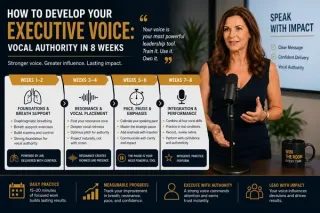
How to Develop Your Executive Voice: Vocal Authority in 8 Weeks
Develop your executive voice with this 8-week vocal authority program. Learn breath support, resonance, pace, pause, and practice routines for senior leaders. ...more
Improve Public Speaking Skills: Expert Tips by Lisa Hugo ,Corporate Communication Tips for CxOs & Executives
July 14, 2026•7 min read
Looking for webinar funnels, digital marketing or a client acquisition system for your coaching or consulting business?
Copyright © 2026 Audacia Marketing Management LLC, All rights reserved.